

All-in-one business management for growing companies
Powered by Microsoft, Dynamics 365 Business Central is a comprehensive cloud ERP solution designed to help small and medium-sized businesses manage finances, operations, sales, and customer relationships in one unified platform. It connects your people, processes, and data—so you can make smarter decisions faster.
What Is Business Central?
Microsoft Dynamics 365 Business Central is an enterprise resource planning (ERP) system that streamlines core business functions across your organization. It replaces disconnected tools and spreadsheets with a single source of truth, accessible anytime and anywhere. Whether you’re managing accounting, inventory, projects, or customer interactions, Business Central provides real-time insights to drive efficiency and growth.
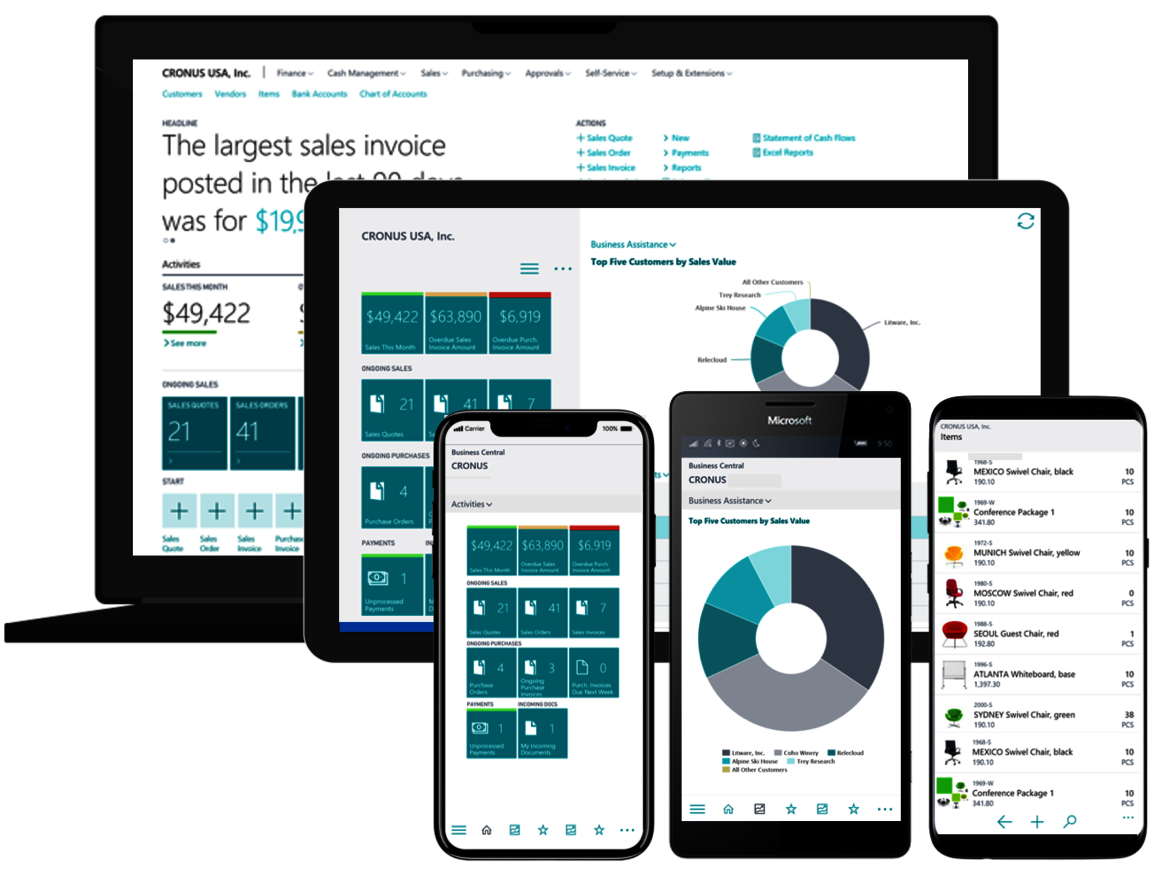
Start Your Digital Transformation Today
Microsoft Dynamics 365 Business Central brings clarity, control, and confidence to your business operations. From Save finance and sales to supply chain and analytics, it provides the tools you need to operate efficiently and scale sustainably. Microsoft Dynamics 365 Business Central empowers businesses to operate smarter, adapt faster, and grow confidently. By bringing together your business data and processes in one intelligent platform, you gain the clarity and control needed to succeed in a competitive market.
Run your entire business with one intelligent platform. Unify finance, sales, operations, and customer management with Dynamics 365 Business Central from Microsoft. Gain real-time insights, automate processes, and scale confidently in the cloud.
Transform the Way You Run Your Business
Unlock efficiency, insight, and growth with Microsoft Dynamics 365 Business Central. Streamline operations, gain real-time insights, and empower your team with an intelligent, connected business management platform. Contact us today to schedule a personalized demonstration and discover how Business Central can support your growth journey. Request a consultation to discover how Business Central can transform your organization’s future.
What’s Your Challenge ? How can we help!!


Key Features
Financial Management
-
General ledger, accounts payable & receivable
-
Budgeting and cash flow forecasting
-
Automated bank reconciliation
-
Financial reporting and compliance tools
Sales & Customer Management
-
Contact and opportunity tracking
-
Quote-to-cash automation
-
Customer insights and interaction history
-
Seamless integration with Microsoft 365 tools
Supply Chain & Inventory
-
Inventory tracking across locations
-
Purchasing and vendor management
-
Demand forecasting
-
Warehouse and order fulfillment optimization
Project Management
-
Project planning and resource allocation
-
Time and expense tracking
-
Project profitability insights
Reporting & Analytics
-
Real-time dashboards
-
Customizable reports
-
Power BI integration for advanced analytics

Business Central adapts to your industry with flexible workflows and specialized functionality.
Manufacturing
-
Production planning and capacity management
-
Bill of materials and shop floor control
-
Supply chain optimization
Retail & E-commerce
-
Inventory visibility across channels
-
Order and returns management
-
Customer purchase insights
Professional Services
-
Project costing and billing
-
Resource scheduling
-
Time and expense tracking
Distribution & Wholesale
-
Warehouse management
-
Demand forecasting
-
Vendor and logistics coordination
Business Central connects with the tools your team already relies on, creating a unified digital workspace.
-
Outlook Integration — Create quotes, invoices, and customer records directly from email.
-
Excel Integration — Edit data in Excel and sync changes instantly.
-
Microsoft Teams Collaboration — Share records and insights within conversations.
-
Power BI Analytics — Turn operational data into actionable visual insights.
-
Third-Party Apps — Extend capabilities through the Microsoft AppSource marketplace.
Business Central is built on modern cloud technology designed for performance, reliability, and scalability.
-
Secure cloud infrastructure with high availability
-
Web-based interface accessible from any device
-
API-driven architecture for integrations
-
Continuous updates with minimal disruption
-
Scalable storage and computing resources
How can we help you
Deploy Microsoft Dynamics 365 Business Central with confidence
Our end-to-end implementation service helps you successfully deploy Dynamics 365 Business Central from Microsoft—aligned to your processes, goals, and growth plans. From discovery and system setup to training and post-go-live optimization, we ensure your ERP works exactly the way your business needs.
What Our Implementation Service Delivers
A Structured, Low-Risk Deployment
We follow a proven methodology that minimizes disruption and accelerates time to value.
Tailored System Configuration
Your workflows, reports, and permissions are configured to match real operational needs.
Clean, Reliable Data Migration
Financials, customers, vendors, and inventory are securely transferred and validated.
User Adoption That Sticks
Hands-on training and role-based guidance ensure your team is confident from day one.
Our Implementation Approach
1. Discovery & Business Analysis
We assess your current systems, processes, and objectives to define a clear implementation roadmap.
Deliverables: requirements documentation, solution design, project plan.
2. Solution Design & Configuration
Business Central is configured to support your accounting structure, approval workflows, and operational processes.
Deliverables: configured environment, custom fields, role-based dashboards.
3. Data Migration & Validation
We cleanse, map, and migrate your historical and master data with strict validation checks.
Deliverables: migrated data sets, reconciliation reports, sign-off.
4. Integration & Customization
Connect Business Central with Microsoft 365, analytics tools, and third-party applications.
Deliverables: API integrations, extensions, automated workflows.
5. Testing & User Training
End-to-end testing and role-specific training prepare your team for go-live.
Deliverables: test scenarios, training materials, user readiness assessment.
6. Go-Live & Ongoing Support
We manage deployment, monitor performance, and provide continuous optimization.
Deliverables: go-live checklist, support plan, improvement roadmap.
Key Capabilities
-
Financial management setup and reporting structure
-
Sales, purchasing, and inventory configuration
-
Multi-company and multi-currency environments
-
Approval workflows and process automation
-
Power BI reporting and KPI dashboards
-
Security roles and compliance controls
Who This Service Is For
-
Organizations upgrading from legacy accounting systems
-
Growing businesses needing integrated finance and operations
-
Companies expanding to multiple locations or entities
-
Teams seeking real-time insights and process automation
Business Outcomes
Faster Financial Close
Automated processes reduce manual effort and reporting delays.
Operational Visibility
Real-time dashboards provide clarity across departments.
Improved Data Accuracy
Centralized data eliminates duplication and errors.
Scalable Foundation for Growth
A flexible ERP platform that evolves with your business.
Implementation Timeline
Typical deployments range from 4 to 16 weeks, depending on complexity, integrations, and data volume. A detailed schedule is provided during the planning phase.
Why Choose Our Team
-
Certified Business Central consultants
-
Proven industry implementation experience
-
Structured methodology with clear milestones
-
Ongoing support and optimization services
-
Focus on measurable business value
Optional Add-On Services
-
Business process reengineering
-
Custom report development
-
Third-party system integrations
-
Advanced analytics setup
-
Managed support services
Frequently Asked Questions
Will implementation disrupt daily operations?
We plan deployments in phases to minimize disruption and ensure continuity.
Can the system be customized?
Yes, workflows, reports, and extensions are tailored to your processes.
Do you provide post-implementation support?
Yes, we offer ongoing support, system monitoring, and continuous improvement services.
Start Your Implementation Journey
Request a Consultation | Schedule a Demo | Talk to an Implementation Expert
Business Central Upgrade Services
Keep your ERP modern, secure, and high-performing with our end-to-end Business Central Upgrade Service. Whether you’re moving from an older version, transitioning from on-premises to the cloud, or optimizing a current deployment, we ensure a seamless upgrade aligned with your business goals—powered by Microsoft.
Why Upgrade Business Central?
Access New Features
Leverage the latest functionality, performance improvements, and user experience enhancements.
Improve Security & Compliance
Stay protected with up-to-date security standards and regulatory support.
Boost Performance & Scalability
Optimize system speed, stability, and capacity for growing operations.
Future-Proof Your ERP
Ensure compatibility with integrations, extensions, and Microsoft ecosystem updates.
What Our Upgrade Service Includes
System Assessment & Upgrade Strategy
We evaluate your current environment, customizations, and integrations to define the safest upgrade path.
Outcome: detailed roadmap, risk analysis, timeline.
Data & Environment Preparation
Data cleansing, extension compatibility checks, and environment setup ensure readiness.
Outcome: validated data sets, prepared test environment.
Extension & Customization Upgrade
We refactor or replace legacy customizations with modern extensions where needed.
Outcome: optimized, upgrade-safe custom features.
Upgrade Execution & Testing
Your system is upgraded in a controlled environment with comprehensive functional and technical testing.
Outcome: verified performance, issue resolution, user acceptance sign-off.
User Training & Go-Live Support
We guide your team through changes and support a confident transition.
Outcome: trained users, stable production environment.
Upgrade Scenarios We Support
-
On-Premises to Cloud Migration
Move to a fully managed cloud environment with improved accessibility and reduced infrastructure costs. -
Version-to-Version Upgrade
Transition from older Business Central or legacy systems to the latest release. -
Customization Modernization
Replace outdated code with scalable, maintainable extensions. -
Performance Optimization Upgrade
Improve reporting speed, data handling, and system responsiveness.
Benefits You Can Expect
Minimal Business Disruption
Phased approach and controlled testing reduce downtime and risk.
Improved User Experience
Cleaner interface, faster processes, and smarter workflows.
Reliable Integrations
Validated connections with Microsoft 365, analytics tools, and third-party apps.
Long-Term Cost Efficiency
Reduced maintenance overhead and simplified future updates.
Our Proven Upgrade Methodology
-
Discovery & Planning – Assess system, define scope, and prepare timeline.
-
Preparation & Validation – Clean data, verify extensions, configure environments.
-
Upgrade Execution – Perform upgrade in test and production environments.
-
Testing & Acceptance – Validate functionality, performance, and security.
-
Go-Live & Optimization – Deploy, monitor, and refine for peak performance.
Who Should Consider an Upgrade?
-
Businesses running outdated version of NAV or old version of Business Central
-
Organizations planning a move to the cloud
-
Companies experiencing performance or integration limitations
-
Teams seeking new functionality and enhanced reporting
Optional Add-On Services
-
Cloud readiness assessment
-
Data archiving and cleanup
-
Integration reconfiguration
-
Advanced analytics and reporting setup
-
Post-upgrade managed support
Frequently Asked Questions
Will we lose data during the upgrade?
No. Data is securely migrated and validated through reconciliation processes.
How long does an upgrade take?
Timelines vary based on system size and complexity—typically a few weeks to a few months.
Will our customizations still work?
We review, update, or modernize custom features to ensure compatibility.
Do you provide post-upgrade support?
Yes, we offer monitoring, optimization, and continuous improvement services.
Upgrade with Confidence
Request an Upgrade Assessment | Schedule a Consultation | Speak with an Upgrade Specialist
Business Central Data Migration Services
Our Business Central Data Migration Service ensures your financials, customers, vendors, inventory, and historical records are transferred to the latest Dynamics 365 Business Central environment with precision and reliability—powered by Microsoft technology and proven migration practices.
We help you eliminate data silos, reduce risk, and start using your new ERP with clean, validated, and fully functional data.
Why Professional Data Migration Matters
Data Accuracy from Day One
Validated and reconciled data ensures reliable reporting and operations.
Reduced Business Risk
Structured processes minimize downtime, data loss, and integrity issues.
Faster ERP Adoption
Clean, organized data accelerates user confidence and system performance.
Compliance & Security
Sensitive business information is transferred using secure protocols and governance controls.
What We Migrate
-
Chart of accounts and financial transactions
-
Customers, vendors, and contacts
-
Inventory items and stock balances
-
Sales and purchase history
-
Fixed assets and depreciation records
-
Open transactions and balances
-
Custom master data and configurations
Our Data Migration Methodology
1. Data Assessment & Planning
We analyze your current systems, data structure, and migration scope.
Deliverables: migration strategy, data mapping plan, timeline.
2. Data Cleansing & Preparation
Duplicate, incomplete, and outdated records are identified and corrected.
Deliverables: clean data sets, standardized formats.
3. Data Mapping & Transformation
Legacy data is mapped to Business Central structures and transformed where needed.
Deliverables: mapping documentation, transformation rules.
4. Migration Execution
Data is securely transferred into the Business Central environment using tested tools.
Deliverables: migrated data, system validation.
5. Reconciliation & Validation
We verify totals, balances, and record accuracy to ensure full integrity.
Deliverables: reconciliation reports, approval sign-off.
6. Go-Live Support
We assist during deployment to ensure your system runs smoothly from day one.
Deliverables: migration support, issue resolution.
Migration Scenarios We Support
Transition from outdated accounting or ERP platforms.
On-Premises to Cloud Migration
Move data securely to a modern cloud environment.
Multi-System Data Consolidation
Combine data from multiple sources into one unified platform.
Upgrade Data Migration
Transfer and transform data during version upgrades.
Benefits of Our Service
Clean, Structured Data Environment
Improved reporting accuracy and system performance.
Minimal Operational Disruption
Carefully planned migration phases reduce downtime.
Improved Decision-Making
Reliable data enables better financial and operational insights.
Scalable Data Foundation
Prepared data structures support future growth and integrations.
Security & Data Protection
-
Encrypted data transfer processes
-
Role-based access controls
-
Backup and recovery safeguards
-
Compliance with data protection standards
-
Secure testing environments
Who This Service Is For
-
Businesses replacing legacy accounting systems
-
Organizations implementing Business Central for the first time
-
Companies migrating from on-premises to cloud
-
Businesses needing data cleanup before ERP deployment
Frequently Asked Questions
Will historical data be preserved?
Yes, historical data can be migrated or archived based on your requirements.
How long does data migration take?
Timelines depend on data volume and complexity, typically a few weeks.
Can you migrate custom data fields?
Yes, custom fields and structures can be mapped and migrated.
Is data migration included in implementation?
It can be part of implementation or delivered as a standalone service.
Start Your Data Migration Journey
Request a Migration Assessment | Schedule a Consultation | Speak with a Data Migration Expert
Your Content Goes Here
Your Content Goes Here
Your Content Goes Here
Your Content Goes Here
Your Content Goes Here
Your Content Goes Here